Comparison11 min read
The best progress photo apps in 2026, compared
The scale can't tell fat from water or muscle. Photos can, if every one is taken the same way. We compared how Fimbl, Progress, Hevy, MacroFactor, MyFitnessPal and Cronometer help you capture, compare and protect your body transformation photos.
On this page
Three weeks of eating well, two workouts a week, and the scale says you've lost 300 grams. Your jeans disagree. So does the mirror, on a good day. Progress photos settle the argument, but only if they're taken the same way every time. Most apps hand you a camera and wish you luck. A few actually help you line up the shot.
For documenting a body transformation alongside your food and weight, Fimbl is our pick: guided front, side, back and face photos, live on-device alignment, hands-free auto-capture, side-by-side and swipe compare, a time-lapse, and photos that never leave your iPhone. All of it is free. Other good options:
- Progress if you want a dedicated photo and measurement app with a passcode lock and iCloud sync.
- Hevy if you lift and want photos next to your workout log.
- MacroFactor if you already use it for adaptive macros and want front, side and back slots.
A note on bias. We make Fimbl, and progress photos are one of the features we're proudest of. Every claim about another app was checked against that company's own help centre, privacy policy or App Store listing in October 2026, and "not documented" means we couldn't find the feature there, not that it definitely doesn't exist. Sources are listed at the end.
Why progress photos beat the scale
The scale measures everything at once: fat, muscle, water, glycogen, last night's salty dinner. That makes it noisy in the short term. In a study of 1,421 adults, weight rose over the weekend and fell during the week as a normal pattern,1 and a Finnish study of daily weigh-ins concluded the same weekly rhythm should be seen as normal, not as weight gain.2
The bigger blind spot is body composition. In a four-week trial combining a calorie deficit, training and a higher-protein diet, participants gained 1.2 kg of lean mass while losing 4.8 kg of fat.3 The scale showed 3.6 kg. The body changed by six. That's the change photos capture and numbers miss: shoulders, posture, waist, the way a T-shirt sits.
- The scalePrecise, frequent and noisy. Great for long-term trends, poor at telling fat from water or muscle.
- PhotosShow shape and proportions. Only useful if every photo is taken the same way.
- How you feelEnergy, sleep, clothes fitting. The measure most worth listening to, and the one no app can take for you.
How to take progress photos you can actually compare
A progress photo is only as good as its consistency. Change the distance, the angle or the light, and you're comparing photography, not bodies.
- Same place, same light. Pick one spot with even, front-facing light. Daylight from a window in front of you works well. Avoid overhead lights that carve shadows.
- Same time and conditions. Morning, before eating, in similar clothes. Food, water and a pump after training all change how you look.
- Same distance and height. Prop the phone at chest height, far enough away that your head and feet both fit. A timer beats a mirror selfie every time.
- Same poses. Front and side at minimum, back if you can. Relaxed, arms slightly away from your body, no sucking in.
- Same rhythm. Every week or two is plenty. Daily photos show mostly noise, and can turn into checking.
This is exactly where most apps stop helping. Getting steps three and four right by yourself, week after week, is hard. It's the part we built Fimbl's camera around.
Progress photo features, app by app
| Feature | Our pickFimbl | Progress | Hevy | MacroFactor | MyFitnessPal | Cronometer |
|---|---|---|---|---|---|---|
| Progress photos | Free | Pro | One a day | Subscription only | One per weigh-in | "Snapshots" |
| Guided poses | Front, side, back, face | Front, side, back | Not documented | Front, side, back slots | ||
| Live alignment guide | Detects your body, coaches you into place | Not documented | Not documented | Not documented | ||
| Overlay of your last photo | Same pose | "Show Last Photo" | Overlay button | Not documented | ||
| Hands-free capture | Auto when lined up, or 3 s / 10 s timer | Not documented | Not documented | Not documented | ||
| Compare | Side by side and swipe slider, auto-aligned | Side by side | Side by side | Before and after | Split photo | |
| Time-lapse | In the app | Not documented | ||||
| Weight with each photo | Plus change and goal progress | Plus measurements | Optional | Body metrics | Per weigh-in | Vitals at upload |
| Food diary in the same app | With hunger and feelings | Workout log | ||||
| Where photos are kept | Only on your iPhone, encrypted, never uploaded | On device, encrypted, iCloud sync | In your Hevy account | Company cloud | Company server | Not stated |
| App lock | No, uses your iPhone's lock | Passcode, Face ID | Not documented | Not documented |
The apps, and who each one suits
-
Best dedicated photo app
Progress
A long-standing body measurement app with front, side and back photos, a "Show Last Photo" overlay, side-by-side compare, and photos encrypted on your device with iCloud sync.4
Keep in mind: photos are part of the paid Pro plan, and there's no food diary.
-
Best for lifters
Hevy
A popular workout tracker where you can add a photo with your measurements, line it up with an overlay of your last one and compare it side by side. Photos stay private even if your profile is public.5
Keep in mind: one photo per day, so front and side shots need separate days, and full body measurements need Pro.
-
Best alongside adaptive macros
MacroFactor
Front, side and back photo slots, one of each per day, plus before-and-after images you can share. A natural fit if you already use its adaptive calorie targets.6
Keep in mind: no free tier, and its privacy notice says data is stored with Google Firebase in the US.7
-
Simplest photo per weigh-in
MyFitnessPal
Add one photo with each weigh-in and compare them as a split photo. Simple, and it lives next to the biggest food database around.8
Keep in mind: no poses or alignment help, and photos sync to MyFitnessPal's servers.
-
A snapshot with your vitals
Cronometer
"Snapshots" attach a photo to the vitals you log at that moment, next to Cronometer's detailed nutrient tracking.9
Keep in mind: it's a photo log rather than a comparison tool: no poses, overlay or compare view.
-
Best overall for body transformation
Fimbl
The only food diary we checked with a guided camera: it finds your body, coaches you into the same position as last time and takes the photo itself. Compare, time-lapse and private, on-device storage are all free.
Keep in mind: iPhone and iPad only, no app lock, and photos stay on that one iPhone: they don't sync to a new phone.
Inside Fimbl's progress photos
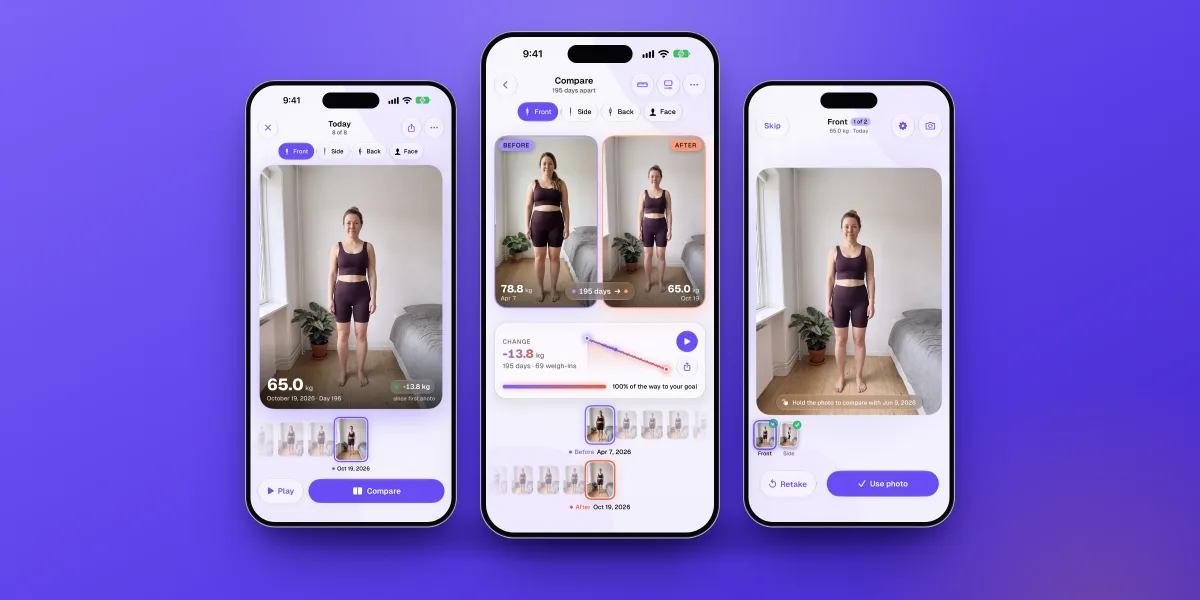
We wanted progress photos to feel like having a patient friend behind the camera. Here's what happens when you take one:
- Line upThe camera finds your body on the device, about eight times a second, and coaches you: step back until your head and feet show, move a little left, lined up with your last photo. Prefer to see it? Toggle a faint overlay of your previous shot.
- CaptureProp your phone up and step back. Once you're in position, a three-second countdown starts and the photo takes itself. Step out of line and it waits for you.
- ComparePhotos are auto-aligned so your body sits in the same place in every frame, whatever your distance from the camera. Compare side by side or swipe between them, or press play for a time-lapse.
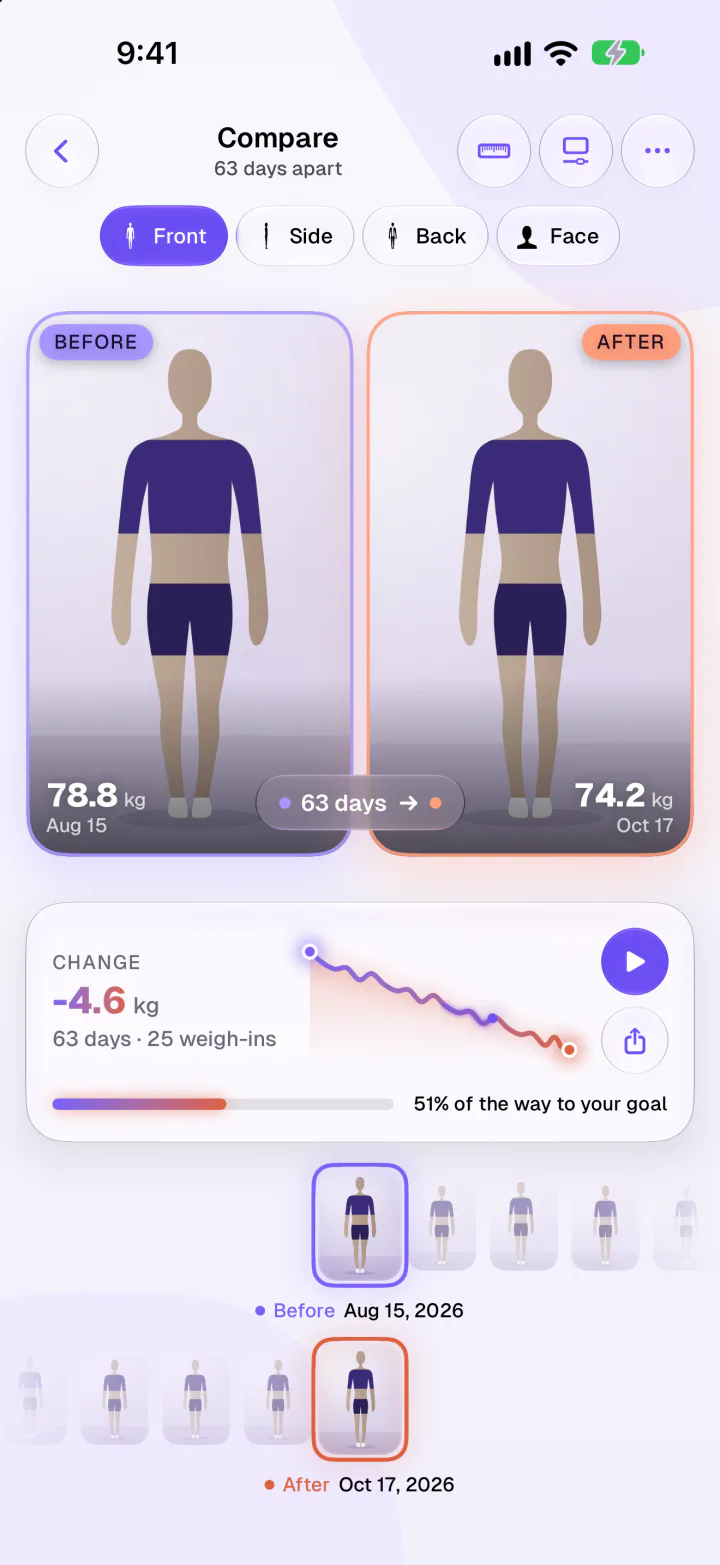
- Front, side, back and face, each as its own series
- Recrop a photo to match, with the other one faintly over it
- Share card for Stories or posts, with weights and dates optional
-
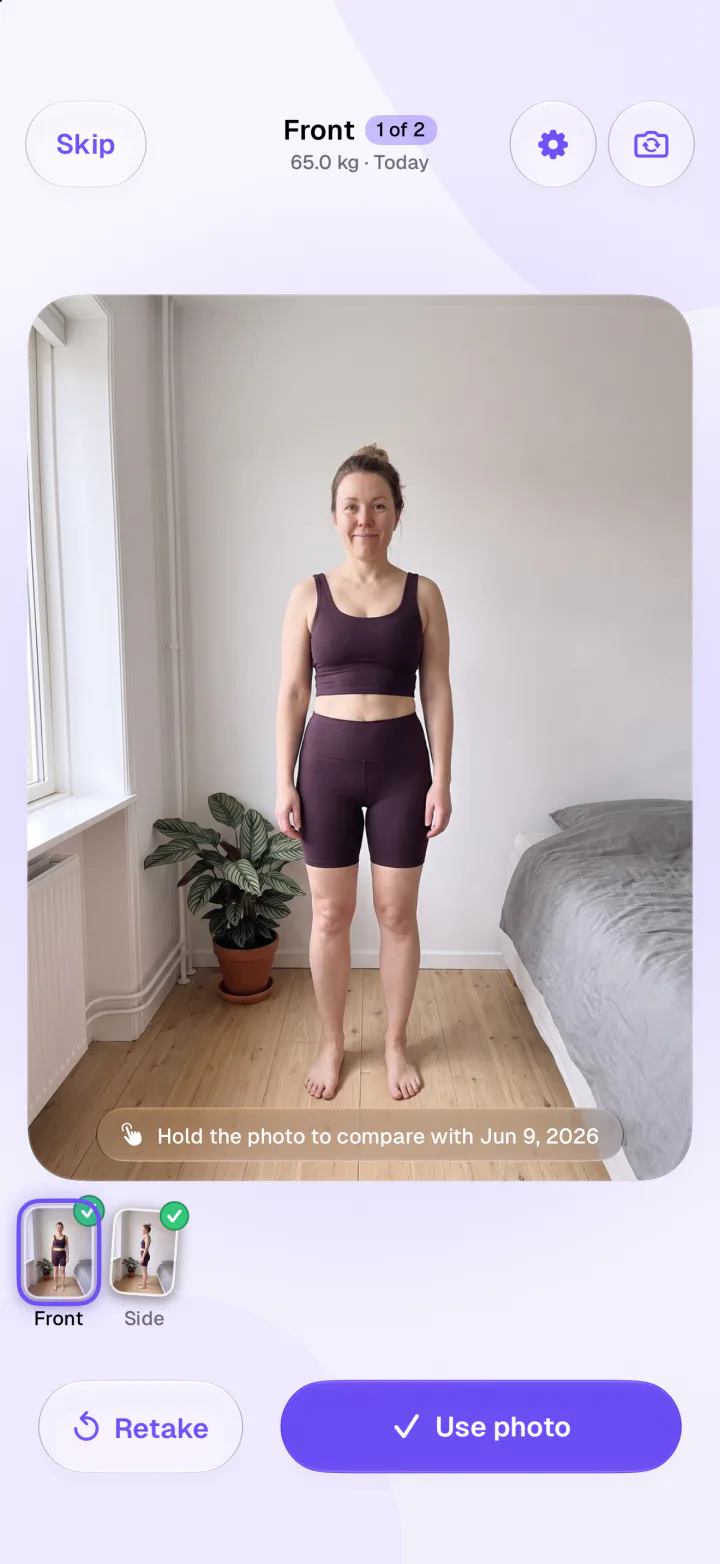
Check it before you keep itHold the new photo to see your previous one in its place, then retake or keep it. Every photo belongs to a weigh-in, so your trend and your pictures always tell the same story.
-
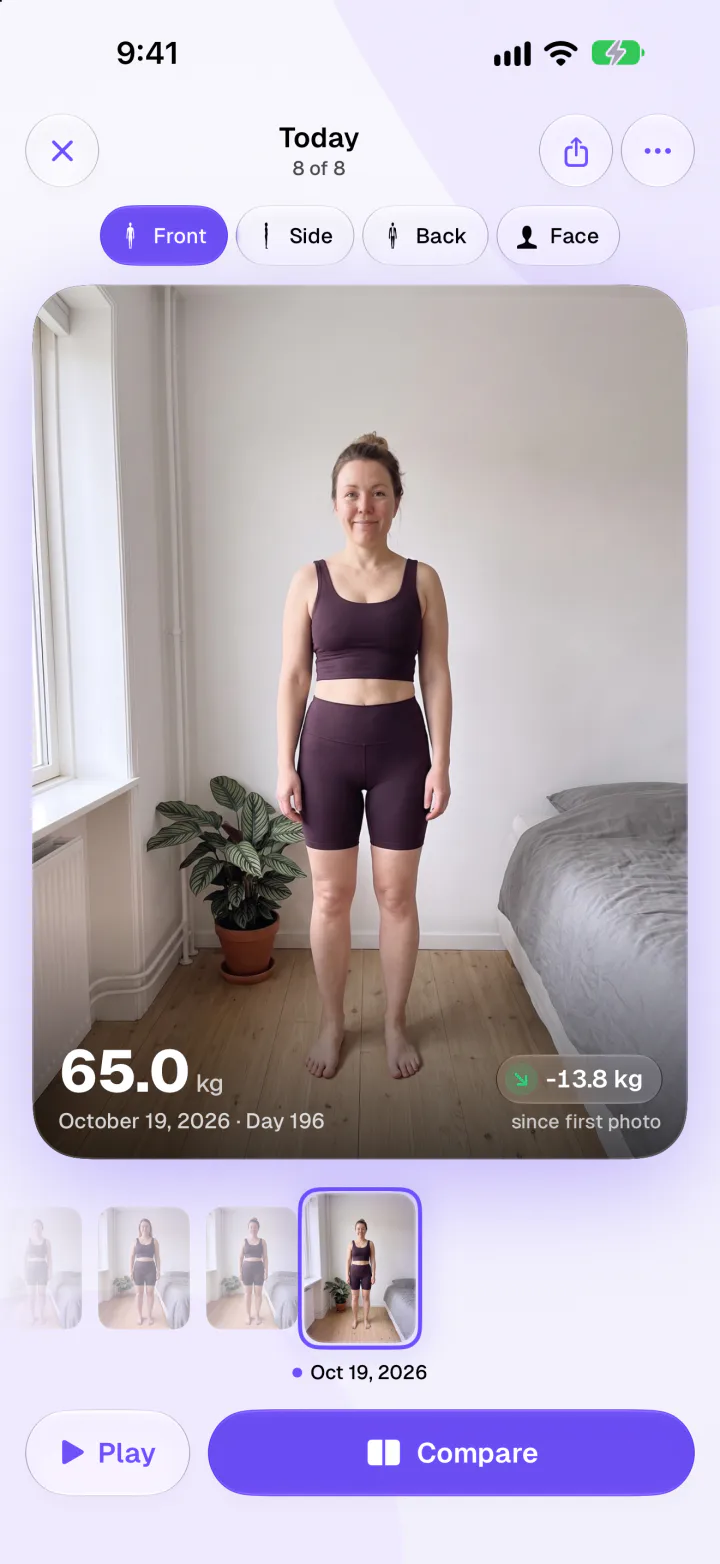
Your whole journey, one swipe awayScrub the strip to move through every weigh-in, see the change since your first photo, or press play for a time-lapse. Meals, mood and activity sit in the same app, so you can see what happened in between.
Privacy: where your body photos live
Progress photos are among the most personal pictures on your phone, often taken in underwear or less. Where they're stored matters. In 2025, researchers found a fitness app's cloud storage left open to anyone, exposing more than 138,000 users' progress photos.10 It was closed after it was reported, but the lesson stands: a photo that's never uploaded can't leak from a server.
How Fimbl stores them
- Only on your iPhone
- Never uploaded to our servers, never used for AI, and the body detection runs on the device.
- Encrypted at rest
- Protected by iOS file encryption and unreadable while your phone is locked.
- Out of backups and your camera roll
- Excluded from iCloud backups and kept out of Photos unless you switch on "Save to Photos".
What that means for you
- They don't follow you to a new phone
- Because they're never backed up, switching phones, deleting the app or signing out removes them.
- Want a copy?
- Turn on "Save to Photos" to keep new shots in your library too. Those copies follow your iCloud Photos settings.
- Sharing is your call
- Only a share card you create ever leaves your phone, and only when you share it.
What about AI body-fat scans?
Some apps now estimate body-fat percentage from photos or a short video. Noom's Body Scan, for example, uses technology from Prism Labs and sends the scan for processing.11, 12 The idea is appealing, but the numbers are rough: an independent study of two smartphone apps found typical errors of 3.9 to 6.2 percentage points of body fat compared with a lab reference.13 That's the difference between 22% and 28%. For tracking your own change, consistent photos and a weight trend tell you more, and they don't require uploading pictures of your body.
Photos should make you feel more informed, not more critical. Repeatedly checking your body can increase body dissatisfaction, especially for people who already worry about how they look.14 Take photos every week or two rather than every day, look at them alongside how you feel, and pause if they start to make you anxious. If thoughts about your body or food take up much of your day, a doctor or an eating-disorder service can help. Fimbl isn't a medical tool or a treatment for eating disorders.
How to choose in one minute
- Want photos, food and weight in one place? Fimbl. It's the only food diary we checked with guided, auto-aligned photos, and they're free.
- Need a passcode lock or sync across devices? A dedicated app like Progress, which encrypts photos and syncs through iCloud.
- Already living in a workout log? Hevy's photo and overlay will fit right into your routine.
- On Android? Fimbl and Progress are iPhone apps. Whatever you choose, look for two things: an overlay of your last photo, and a clear answer on where your photos are stored.
Whichever you pick, the rule is the same: same spot, same light, same pose, every week or two. And if the scale and the mirror still disagree, remember the study above: six kilograms of change can look like three and a half on the scale. Our guide on how to start a food diary covers the eating side of the story, and our calorie tracker comparison looks at the apps beyond photos.
See the change, not just the number
Fimbl's camera lines you up, takes the photo for you and keeps it only on your iPhone. Compare any two weigh-ins, play your whole journey as a time-lapse, and see it next to your meals and mood.
- Guided front, side, back and face photos
- Side-by-side, swipe and time-lapse, free
- Never uploaded, never used for AI
Questions, answered
What is the best app for progress photos?
It depends on what else you track. For progress photos alongside a food diary and weight, Fimbl offers guided front, side, back and face photos, live on-device alignment, auto-capture, side-by-side and swipe compare and a time-lapse, all free and stored only on your iPhone. Progress is a strong dedicated photo app with a passcode lock and iCloud sync, and Hevy suits people who already log workouts.
How do I take consistent progress photos?
Use the same spot, light, time of day, clothing, camera height and distance every time, and the same poses: front and side at minimum, back if you can. Prop the phone up and use a timer rather than a mirror. An app with an overlay of your last photo, or Fimbl's live alignment guide, makes lining up much easier.
How often should I take progress photos?
Every one to two weeks is plenty. Daily photos mostly show day-to-day noise such as water and food, and frequent body checking can increase body dissatisfaction for some people. Taking photos together with a weigh-in keeps the rhythm simple.
Why do I look different but weigh the same?
The scale combines fat, muscle, water and glycogen. Weight naturally rises and falls through the week, and if you're training while eating less you can gain muscle while losing fat. In one trial, people gained 1.2 kg of lean mass while losing 4.8 kg of fat in four weeks, so the scale understated the change. Photos capture shape changes the scale misses.
Are progress photos in fitness apps private?
It varies. Many apps upload photos to the company's servers or cloud. Others, such as Fimbl, keep them on your phone. In Fimbl, progress photos are never uploaded, never used for AI, encrypted on the device and excluded from iCloud backups. The trade-off is that they don't transfer to a new phone unless you save copies to Photos.
Can an app measure body fat from a photo?
Some apps estimate it, usually by sending your photos or video to a server for analysis. The estimates are rough: an independent study of two smartphone apps found typical errors of 3.9 to 6.2 percentage points compared with a laboratory method. Consistent photos and a weight trend are more useful for tracking your own change.
Are Fimbl's progress photos free?
Yes. Capturing, comparing, the time-lapse, recropping and the share card are all part of the free version of Fimbl for iPhone and iPad, with no ads.
Sources
- Turicchi J et al. (2020). Weekly, seasonal and holiday body weight fluctuation patterns among individuals engaged in a European multi-centre behavioural weight loss maintenance intervention. PLoS ONE 15(4). pubmed.ncbi.nlm.nih.gov
- Orsama AL et al. (2014). Weight rhythms: weight increases during weekends and decreases during weekdays. Obesity Facts 7(1). pubmed.ncbi.nlm.nih.gov
- Longland TM et al. (2016). Higher compared with lower dietary protein during an energy deficit combined with intense exercise promotes greater lean mass gain and fat mass loss: a randomized trial. American Journal of Clinical Nutrition 103(3). pubmed.ncbi.nlm.nih.gov
- Progress help centre: are my photos and data private? Checked October 2026. help.theprogressapp.com
- Hevy help centre: body composition tracking, measurements and progress photos. Checked October 2026. help.hevyapp.com
- MacroFactor help centre: how to add progress photos. Checked October 2026. help.macrofactorapp.com
- MacroFactor privacy notice. Checked October 2026. macrofactor.com
- MyFitnessPal support: progress photos FAQs. Checked October 2026. support.myfitnesspal.com
- Cronometer support: Snapshots. Checked October 2026. support.cronometer.com
- Cybernews (2025). Fitness app leak exposes users' progress photos. cybernews.com
- Noom: in-app Body Scan technology announcement. noom.com
- Prism Labs privacy policy. Checked October 2026. prismlabs.tech
- Graybeal AJ, Brandner CF, Tinsley GM (2022). Visual body composition assessment methods: a 4-compartment model comparison of smartphone-based artificial intelligence for body composition estimation in healthy adults. Clinical Nutrition 41(11). pubmed.ncbi.nlm.nih.gov
- Geiger G et al. (2024). Longer-term consequences of increased body checking in women at risk for eating disorders: a naturalistic experimental online study. PLoS ONE 19(12). pubmed.ncbi.nlm.nih.gov